Nonogram puzzles guide
How to Turn a Photo Into a Nonogram Puzzle
Turn a photo of your pet or a favorite place into a solvable nonogram: how conversion works, which photos work best, grid size and color tips, and pitfalls.
To turn a photo into a nonogram, you shrink the picture to a small grid, decide which squares are filled (or which color each one is), write down the run lengths of every row and column as clues, and then check that the clues lead to exactly one solution by logic alone. That last step is the one most people skip — and the reason many homemade puzzles turn out unsolvable or ambiguous.
Below we explain each step, show which photos make good puzzles, and walk through doing it automatically in NonoPop or by hand on paper.
How photo-to-nonogram conversion works
- Pick the subject. A nonogram has very few squares, so the picture needs one clear subject. Busy backgrounds become noise. Good tools isolate the subject first, either by cropping or by removing the background.
- Resize to the grid. The image is scaled down to the puzzle size — 15×15, 20×20 and so on — keeping its proportions. Each square of the puzzle now represents a small patch of the photo.
- Decide filled or empty. For a classic black-and-white puzzle, each square is compared with a brightness threshold: darker than the threshold is filled, lighter is empty. Where the threshold sits decides how much shading survives.
- Choose colors (color puzzles only). For a color nonogram the photo's colors are grouped into a small palette — typically two to four colors — and each square takes the nearest one.
- Write the clues. For each row and column, count the runs of filled squares. A row that reads
..###..#..becomes the clue3 1. - Check it is solvable. Run the clues through a solver to confirm there is exactly one solution, reachable step by step. If not, adjust the threshold, size or detail and try again.
Why some photos don't make solvable puzzles
Every grid gives a set of clues, but not every set of clues has a single answer. The smallest example is a 2×2 grid with one filled square in each row and column:
       1 1          1 1
   1   # x      1   x #
   1   x #      1   # x
Both grids have identical clues — 1 on every row and every column — so a solver cannot tell them apart. Real photos produce the same problem on a bigger scale wherever the picture has a checkerboard-like texture: fur, foliage, gravel, patterned fabric. Those areas turn into scattered single squares, and scattered single squares are exactly what makes clues ambiguous.
Even when a puzzle has one solution, it may only be findable by trial and error. A good converter rejects those too. That is why a careful tool will sometimes tell you a photo did not work, rather than hand you a puzzle you cannot finish fairly.
Which photos make the best nonograms
The photos that work best share a few traits:
- One main subject that fills most of the frame — a pet's head, a single flower, a mug, a bike.
- A recognizable outline. Silhouettes and side views read better at low resolution than straight-on faces. Ears, a tail or a handle make a shape instantly identifiable.
- Strong contrast between subject and background, and between the main areas of the subject — a black-and-white cat beats a beige dog on a beige sofa.
- A plain background, or one that background removal can easily separate.
- Large areas of solid color rather than fine texture or tiny details.
- Even light. Harsh shadows become shapes of their own once the image is reduced to a few colors.
Quick test: squint at the photo, or view it as a tiny thumbnail. If you can still tell what it is, it will probably make a good puzzle. If it turns into a blur, a bigger grid or a different photo will serve you better.
Choosing grid size, detail and colors
| Grid | Good for | Solving time |
|---|---|---|
| 5×5 to 10×10 | Simple icons and bold shapes — a heart, a fish, a logo-like outline | Minutes |
| 15×15 | Objects and animals with one or two defining features | A focused coffee break |
| 20×20 to 25×25 | Pets, faces, landmarks — anything where detail makes it recognizable | A long session |
A larger grid keeps more detail but also gives the solver more fine texture to stumble over, so pair big grids with less detail and small grids with bolder shapes. For color puzzles, two or three colors usually beat four: each extra color has to be clearly different from the others, or the solver has to remember subtle shade differences across hundreds of squares. If two colors in the photo are close, a good converter merges them.
How to do it in NonoPop
NonoPop builds photo puzzles on your phone. Creating new photo puzzles is part of NonoPop Premium, a one-time upgrade.
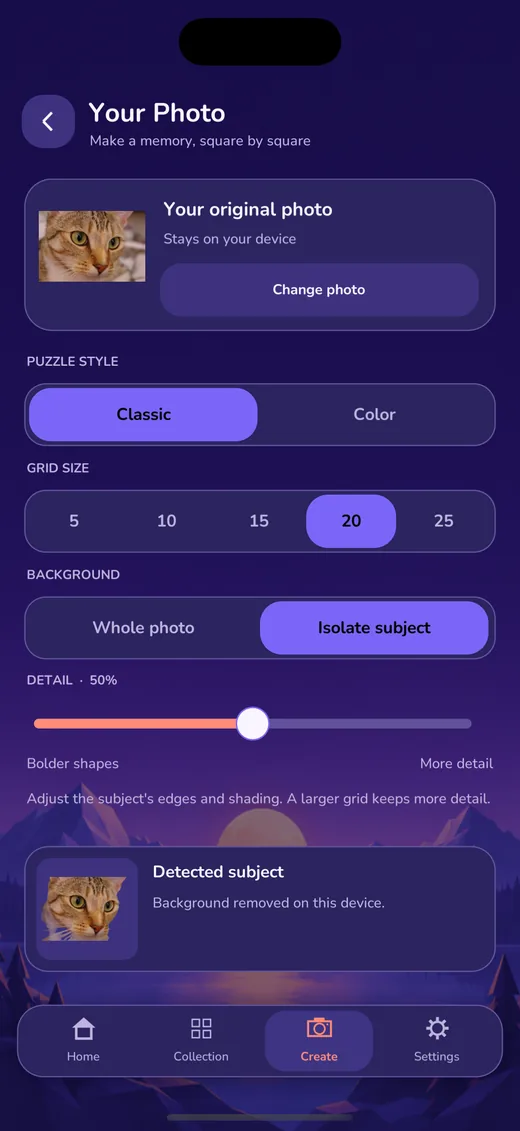
- Open Your Photo from the Home screen or the Create tab, and tap Choose a photo. You pick the picture in the system photo picker; the app does not browse your gallery.
- Choose a puzzle style: Classic for black and white, or Color.
- Pick a grid size from 5 to 25. A new photo starts at 20×20.
- Choose the background. Isolate subject finds the main subject and removes the background on your device; the Detected subject card shows the cutout. Whole photo keeps the full frame, which suits landscapes and photos with no single subject.
- Adjust Detail between Bolder shapes and More detail. For Color, also choose 2, 3 or 4 colors from your photo.
- Check the preview. NonoPop shows the exact puzzle it built, with its size and number of colors. It only offers puzzles that can be solved from their clues; if a setting does not work, it says so and you can try another.
- Give it a name and tap Save & play. The puzzle is saved to My Photos in your collection.
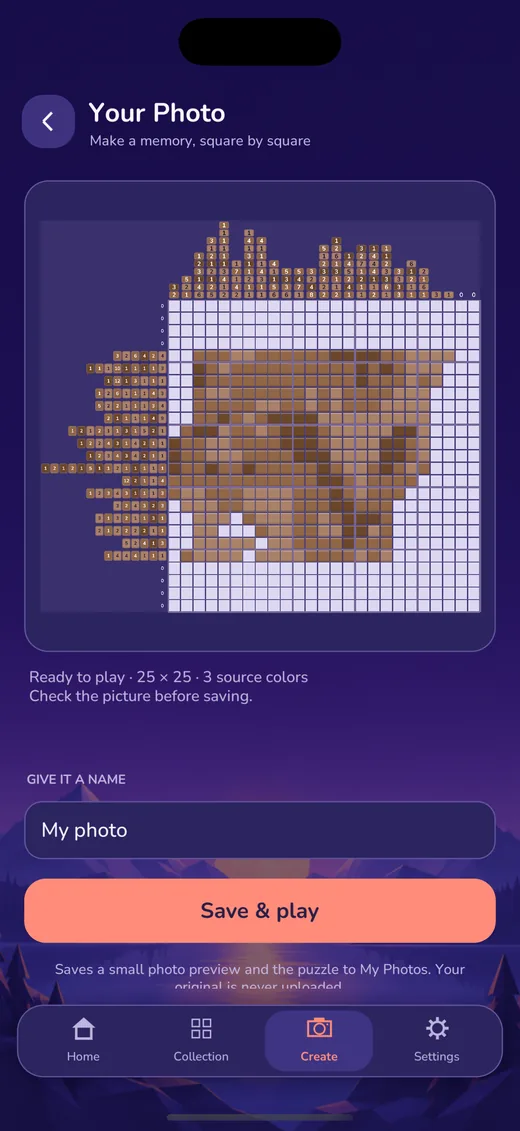
A few things we designed on purpose. The photo is processed entirely on your device and never uploaded. A saved photo puzzle keeps only the puzzle, its name and a small preview — not a copy of your original photo, its location data or its file path. Deleting a photo puzzle removes it from NonoPop and leaves the original in your photo library. And if your Premium status ever changes, photo puzzles you already saved stay playable.
How to make one by hand
No app? You can make a photo nonogram with graph paper and patience:
- Crop tightly around the subject and print the photo, or open it on a screen.
- Lay a grid over it. Draw a 15×15 grid on tracing paper, or use an image editor's pixelate filter set to 15 blocks across.
- Fill each square that is mostly subject or mostly dark. Be decisive; half-filled squares are where ambiguity starts.
- Clean up. Remove isolated single squares that do not add to the shape, and fill single-square holes. These are the main source of ambiguity.
- Write the clues for every row and column by counting runs.
- Test it on a blank grid using only the clues, ideally by someone else. If you reach a point where nothing can be deduced, change a square or two near that spot and try again.
Testing by hand is slow on anything larger than 10×10, which is why automatic converters run a solver for you. To learn the logic your testers will need, see how to solve nonograms and, for color versions, how to solve color nonograms.
Ideas for photo puzzles
- Pets — the classic choice. A close-up of the head with clear ears works better than a full-body shot.
- Trip souvenirs — a single landmark against the sky, a boat, a mountain outline.
- Favorite objects — a guitar, a teapot, a bike, a plant.
- Food — a slice of cake or a piece of fruit, shot from directly above on a plain plate.
- A surprise for someone — solve it together and see who recognizes the picture first.
Frequently asked questions
Why did my photo fail to convert?
Usually because the subject was unclear or the result could not be solved by logic alone. Try isolating the subject, choosing a smaller grid or bolder shapes, using fewer colors, or picking a photo with more contrast.
Will my photo be uploaded anywhere?
That depends on the tool. In NonoPop, conversion — including background removal — runs on your phone, and the photo is never uploaded. For other tools, check their privacy policy before using personal photos.
What size should a photo nonogram be?
15×15 is a good default for objects, and 20×20 to 25×25 for pets and faces. Go bigger only when the picture is unrecognizable at the smaller size.
Can a photo nonogram have more than one solution?
A careless conversion can, as the 2×2 example shows. A converter that verifies each puzzle with a solver, as NonoPop does, only accepts boards with exactly one solution reachable by logic.