Budgeting guide
How to Budget Without Linking Your Bank Account
A practical system for manual budgeting: what to track, a 2-minute daily logging habit, a weekly bank check, CSV imports and the mistakes that break it.
You can run a complete, accurate budget without connecting a single bank account. All it takes is a short daily habit of logging what you spend, a weekly check against your real bank balance, and a simple set of categories. Many people find that typing in each purchase actually makes them spend more carefully, because every expense passes through their hands twice.
This guide walks through the full manual system: how to set it up, how to keep it accurate with very little effort, and when importing a file from your bank makes sense.
Why people budget without bank sync
Automatic bank connections are convenient, but they are not the only way to budget, and they come with trade-offs. Common reasons to go manual:
- Privacy. A linked budgeting service may receive a detailed history of where you shop, what you earn and who you pay. A manual budget only contains what you decide to type in.
- Security. Fewer services with access to your accounts means fewer places your financial data can leak from. We cover this in more depth in are budget apps safe?
- Reliability. Bank connections can break, duplicate transactions or miscategorize them, and fixing those errors can take longer than logging a purchase yourself.
- Awareness. When an app imports everything silently, it is easy to stop looking. Entering a purchase forces a tiny moment of reflection: was that worth it?
- Cash and mixed money. Cash, shared expenses, money owed by friends and accounts at different institutions all fit into a manual budget just as easily as card purchases.
The cost is a few minutes a day. The rest of this guide is about keeping those minutes short.
Set up a manual budget in 20 minutes
- List the accounts you actually spend from. Usually that is one checking account, one or two credit cards and cash. Savings accounts you rarely touch can wait. Fewer accounts means less to reconcile.
- Write down each account’s current balance. This is your starting point. From now on, every income, expense and transfer you record should move that number the same way your bank does.
- Choose 8–12 spending categories. Start broad: housing, groceries, dining out, transportation, utilities, shopping, health, entertainment, subscriptions and “other”. You can split categories later once you know where the money goes.
- Note your fixed monthly bills — rent, insurance, phone, loan payments, subscriptions — with their due dates. These are predictable, so they are easy to plan around.
- Set a first spending limit for your three biggest flexible categories, such as groceries, dining out and shopping. Do not try to budget everything perfectly in month one. Our step-by-step guide to making a monthly budget covers the full process.
Tip: If you are not sure what to budget yet, log every expense for one month without any limits. That month of real data is worth more than any guess.
The two-minute daily logging habit
Manual budgeting succeeds or fails on one thing: whether you record purchases while you still remember them. A few rules make it stick:
- Log at the moment of purchase when you can — standing at the checkout or walking out of the store. It takes seconds when the receipt is still in your hand.
- Pick a daily catch-up time for anything you missed, such as after dinner. Check your banking app’s recent activity to jog your memory, then enter the missing items.
- Record the amount, category and account; add a note only when it helps. “Groceries, 84.35, credit card” is enough. Notes are useful for things you will want to search later, like a store name or a refund you are waiting for.
- Use the same names every time. If you call it “Groceries” today and “Food shopping” tomorrow, your reports will be split in two.
- Record income too. Paychecks, side income and refunds are what make your balance and savings rate meaningful.
What about cash?
Treat a wallet like any other account. When you withdraw from an ATM, record a transfer from checking to cash rather than an expense. Then log what you spend from the cash account as normal. This keeps your spending categories honest — the ATM withdrawal is not “spending”, the coffee you buy with it is.
What about credit cards?
Record card purchases as expenses on the card account when you make them, not when the statement arrives. When you pay the card bill, record a transfer from checking to the card. Paying the bill is moving money between your own accounts, so it should not count as spending a second time.
The weekly 10-minute bank check
Once a week, compare each account in your budget with the real balance in your banking app. This is called reconciling, and it is what keeps a manual budget accurate.
- Open your bank or card app and note the current balance, ignoring pending items that have not posted yet.
- Compare it with the balance in your budget for the same account.
- If they match, you are done. If not, scroll through the bank’s transaction list for the past week and look for anything missing from your budget: automatic payments, bank fees, interest, small purchases and refunds are the usual suspects.
- Add what is missing. If a difference remains that you cannot explain, record a small adjustment and make a note of it — do not let one mystery amount stop the whole habit.
Doing this weekly matters. Seven days of transactions are easy to scan; five weeks of them are a chore people put off until they abandon the budget.
Importing a bank statement instead of typing
Linking an account and importing a file are not the same thing. Many banks let you download your transactions as a CSV file from online banking. You can bring that file into a budgeting tool once, on your terms, without giving the tool ongoing access to your bank.
This is handy when you are starting out and want a few months of history, or when you fall behind after a holiday. A few things to watch:
- Clean the file first. Bank exports often include balance columns, pending items and inconsistent descriptions. Keep only date, amount, description and a category column you fill in yourself.
- Watch the sign convention. Some banks export spending as negative numbers, others use separate debit and credit columns. Make sure income and expenses end up on the right side.
- Avoid duplicates. Import a date range that starts after the last transaction you logged by hand.
For day-to-day tracking, manual logging is usually still faster than a monthly import, because you categorize as you go instead of facing a pile of cryptic merchant codes at the end of the month.
Mistakes that make manual budgets fail
- Too many categories. Thirty categories make every entry a decision. Start broad and only split a category when you need the detail.
- Chasing every cent. A budget that is off by a few dollars is still doing its job. Use an adjustment and move on.
- Counting transfers as spending. Card payments, moving money to savings and ATM withdrawals are transfers. Recording them as expenses double-counts your spending.
- Forgetting irregular costs. Annual insurance, car repairs and gifts will blow up a month that looked fine. Plan for them with sinking funds.
- No backup. If your budget lives only on your phone, export or back it up regularly. A lost or broken phone should not take months of records with it.
How to do it in BudgetVault
We built BudgetVault for exactly this style of budgeting. It has no bank connection and no account sign-up, and your records are stored on your phone. Here is how the system above maps to the app on Android:
- Accounts: add your checking account, cards and cash under Settings → Accounts. The free version includes up to 3 accounts; Pro removes the limit.
- Daily logging: tap +, choose Expense, Income or Transfer, enter the amount, pick a category and save. If you type a note you have used before, BudgetVault suggests the category you picked last time.
- Reminders: turn on Daily Reminder in Settings and choose up to five reminder times a day for your catch-up habit.
- Weekly check: use the account filter and the History tab’s search and filters to review one account at a time.
- Imports and backups: under Settings → Export & Backup you can import a CSV with Date (YYYY-MM-DD), Type, Amount and Category columns (Account and Note are optional), export CSV or PDF, and create a backup file. These data tools are free.
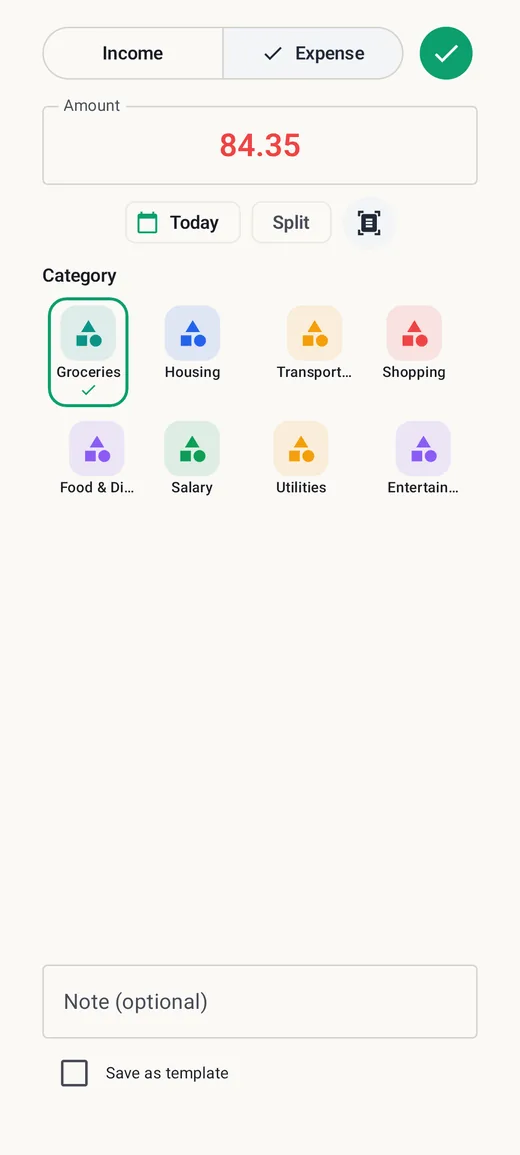
Pro adds tools that make manual entry faster, such as reusable templates for purchases you repeat, split transactions for a single receipt that covers several categories, and receipt OCR that suggests the amount, merchant, date and category from a photo for you to review before saving.
Frequently asked questions
Is manual budgeting accurate enough?
Yes, as long as you reconcile. A weekly comparison with your real bank balance catches missed entries, fees and refunds, so small errors never pile up.
How long does manual tracking take?
Most of the time goes into building the habit. Once it is routine, logging a purchase takes seconds and the weekly check about ten minutes. The first month is the hardest.
Should I log purchases when they post or when I make them?
When you make them. That is when you remember what they were, and it keeps your budget ahead of your bank instead of behind it.
Can I still see where my money goes without automatic categories?
Yes. Because you choose the category for every entry, manual categories are often cleaner than automatic ones. Monthly category totals give you the same picture, and our 50/30/20 rule guide shows one way to judge whether the split looks healthy.
This guide is general information, not financial advice. BudgetVault is a budgeting tool, not a bank or financial adviser.