Budgeting guide
How to Make a Monthly Budget That You Will Actually Follow
Build a realistic monthly budget in seven steps: plan on a safe income figure, average variable costs, spread annual bills and give every leftover dollar a job.
A monthly budget is a plan for the money you expect to receive this month: what goes to fixed bills, how much you allow for everyday spending, what you set aside for irregular costs, and what goes to savings. A good one is built from your real numbers, not from what you wish you spent — and it is reviewed and adjusted every month.
This guide takes you through seven steps with a fully worked example. Set aside an hour for the first budget; after that, setting up each new month takes about fifteen minutes.
Step 1: Gather three months of numbers
Pull the last three months of bank and card statements, plus any records of cash spending. Three months is enough to smooth out one unusual month without going back so far that the numbers are out of date.
You need two things from them: what you earned (take-home, after taxes and deductions) and what you spent, grouped into rough categories. Do not worry about perfect categorization yet.
Step 2: Choose a safe income figure
Budget on the income you are confident you will receive, not the income you hope for.
- Steady salary: use your normal monthly take-home pay.
- Paid every two weeks: most months contain two paychecks, but two months a year contain three. Budget on two and treat the third as a bonus for savings or debt.
- Variable income (freelance, commission, shift work): use the lowest of the last three months. In a good month, the extra goes into a buffer that tops up lean months.
In our example, take-home pay over three months was $3,640, $3,910 and $3,720. The average is about $3,757, but we budget on the lowest: $3,640.
Step 3: List fixed bills
Fixed bills are the same (or nearly the same) every month, and you cannot easily skip them. List each with its amount:
| Fixed bill | Monthly |
|---|---|
| Rent | $1,150 |
| Student loan minimum | $180 |
| Car and renters insurance | $120 |
| Internet | $55 |
| Phone | $45 |
| Streaming and apps | $25 |
| Total fixed | $1,575 |
While you are here, check whether any of these can be lowered — a cheaper phone plan, a forgotten subscription. Fixed bills are the best place to save because a cut keeps working every month without effort.
Step 4: Set limits for variable spending
Variable spending changes month to month: groceries, fuel, dining out, household items. Average the last three months for each category, then set a limit close to that average — slightly lower if you want to cut back, but not so low that you blow it in week two.
| Category | Last 3 months | Average | Budget |
|---|---|---|---|
| Groceries | $410 / $465 / $438 | $437.67 | $440 |
| Dining out | $190 / $260 / $215 | $221.67 | $200 |
| Fuel and transit | $150 / $170 / $142 | $154.00 | $155 |
| Personal care | $90 / $70 / $110 | $90.00 | $90 |
| Household | $60 / $85 / $40 | $61.67 | $65 |
| Total variable | $950 |
Notice the one deliberate cut: dining out drops from an average of about $222 to $200. One realistic cut is far more likely to stick than five ambitious ones.
Step 5: Spread irregular costs across the year
This is the step most budgets skip, and the reason most budgets “fail” in a month with a car repair or a birthday. List costs that do not arrive monthly, estimate the yearly total and divide by 12:
| Irregular cost | Per year | Set aside monthly |
|---|---|---|
| Car maintenance and registration | $720 | $60 |
| Gifts and holidays | $600 | $50 |
| Medical and dental | $300 | $25 |
| Annual subscriptions | $120 | $10 |
| Total | $1,740 | $145 |
Move that monthly amount into savings and spend from it when the bill arrives. These pots are called sinking funds — see our guide to sinking funds and savings goals for how to run them.
Step 6: Give the leftover a job
Now subtract everything from your safe income:
$3,640 − $1,575 fixed − $950 variable − $145 irregular = $970 left over.
Money without a plan tends to disappear, so assign all of it:
| Goal | Monthly |
|---|---|
| Emergency fund | $400 |
| Extra student loan payment | $200 |
| Vacation fund | $150 |
| Fun money (no questions asked) | $120 |
| Buffer for overspending | $100 |
| Total | $970 |
Two lines deserve a comment. Fun money is guilt-free spending that keeps the rest of the budget from feeling like a diet. The buffer absorbs small overruns; whatever is left at month-end goes to savings. Giving every dollar a job like this is the core idea of zero-based budgeting, and it works even if you never use that name.
Want a quick sanity check on the overall shape? Compare your totals with the 50/30/20 rule. This example puts $750 — about 21% of take-home pay — into the emergency fund, the vacation fund and extra loan payments, right around the rule’s 20% target.
Step 7: Run the month and review it
- On payday, move savings and sinking-fund money first, then pay fixed bills. What remains is for variable spending.
- Log spending as you go, by hand or by checking your bank app daily. Our guide to budgeting without linking a bank account describes a simple routine.
- Check pace mid-month. If you have spent 70% of the grocery budget by day 10, that is a signal to slow down now, not at the end of the month.
- If you overspend a category, move money from another one. A budget is a plan you can change, as long as the total stays the same.
- At month-end, review for ten minutes. Which categories were too tight or too loose? Adjust next month’s limits. Most budgets need two or three months of tuning before they feel right.
The first month is a draft. Expect to be wrong about a few categories. The goal of month one is to learn your real numbers, not to be perfect.
Building your monthly budget in BudgetVault
BudgetVault follows the same structure. Budgets belong to an account, so on the Budget tab choose the account you spend from in the account filter, then tap a category to set its monthly limit; the Overall bar shows total spending against all your category limits, and each category gets its own progress bar.
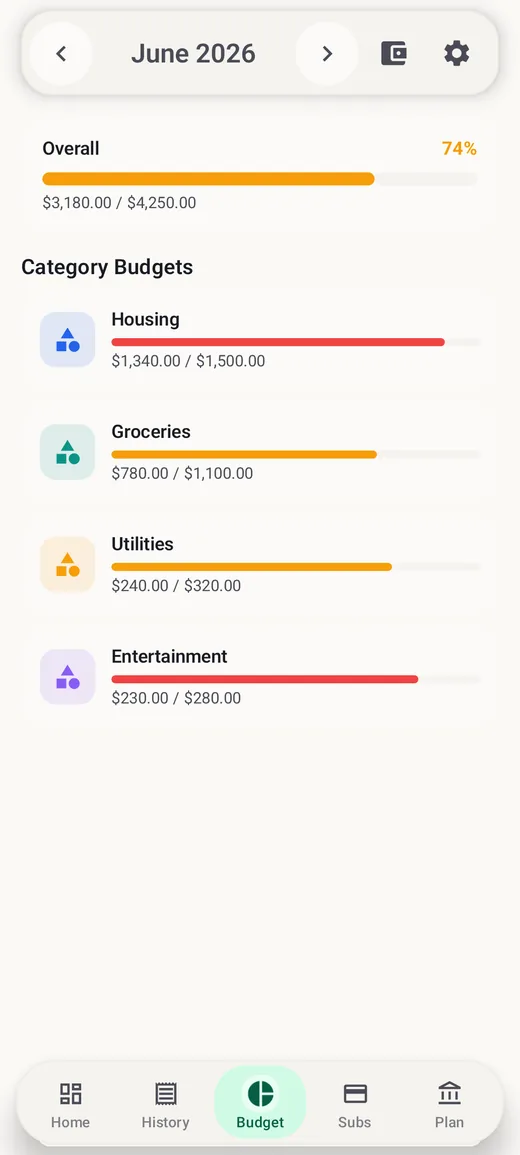
- Limits carry forward. When a new month starts, your budgets are copied from the latest earlier month, so you only edit what changed.
- Alerts: get an optional warning at 80% of a category budget and another when you reach 100%. With Pro, spending-pace alerts warn you when you have used noticeably more of a budget than the share of the month that has passed.
- Free limits: the free version includes up to 5 monthly category budgets — enough for your biggest variable categories. Pro, a one-time purchase, makes budgets unlimited and adds savings goals for sinking funds.
Frequently asked questions
Should I budget weekly or monthly?
Monthly works best for most people because rent and most bills are monthly. If you are paid weekly, you can still plan monthly and simply check your variable spending each week.
What if my income changes every month?
Budget on your lowest recent month. In better months, put the extra into a buffer account that you draw from in lean months, so your spending plan stays steady.
How much should I keep as a buffer?
Enough to cover the usual small overruns — often a few percent of your variable spending. Anything left at month-end can roll into savings.
How detailed should my categories be?
Detailed enough to act on, and no more. If a category is always on target, you do not need to split it. If one keeps going over, splitting it can show why.
This guide is general information, not financial advice. The figures are an example; use your own numbers.